Custom instructions
Set, once and globally, how it should talk to you — tone, identity, defaults.
Custom instructions are standing orders applied to every conversation. Tell it your preferred tone ("don't be an HR business partner — just talk to me normally"), who you are, and any defaults you always want. It's the cheapest way to stop repeating yourself and to bend the model's generic voice toward what you actually like.
In Settings → Customize ChatGPT, he sets the traits he wants ("be educational whenever you can"), a bit about his identity, and a specific default: since he's learning Korean, it should use a particular level of formality unless told otherwise.
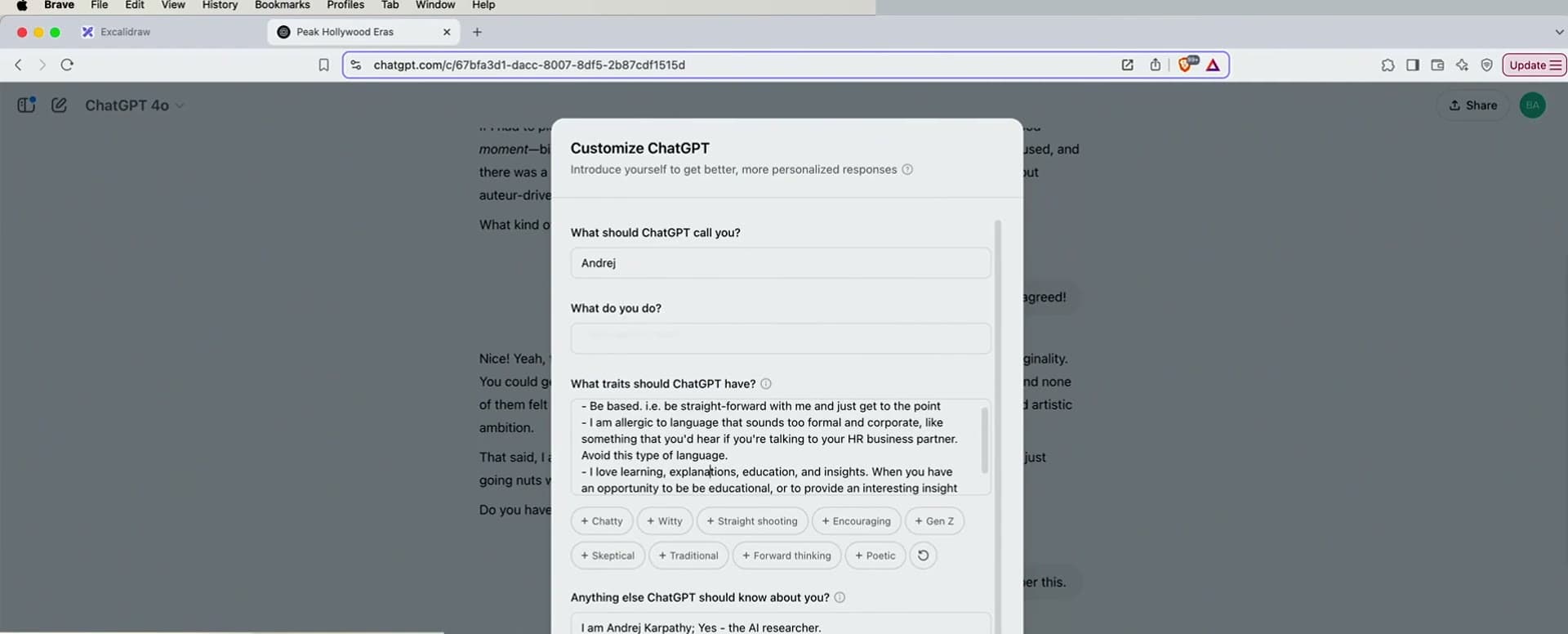
“I just kind of told it: don't be like an HR business partner, just talk to me normally. And also, I love explanations, educations, insights — so be educational whenever you can.”
Andrej Karpathy·1:52:36
His Korean example is instructive: without a default, it flip-flops between too-formal and too-casual. One custom instruction pins the register he wants — a small setting that removes a recurring annoyance from every future reply.
The load-bearing points
- Custom instructions apply globally, to every conversation.
- Set tone, identity, and defaults once.
- Kills repetitive re-explaining and tames the generic voice.
- Most other LLMs have an equivalent — look in settings.
Fix the voice
Write one custom instruction about tone (e.g. “be direct, skip the corporate hedging, be educational”). Feel the difference in the next reply.
Show the point
This is the highest-leverage setting most people never touch.
Pin a default
Add a default you always want (units, language register, format). Confirm it holds across a new chat.
Show the point
His Korean-formality default is the template — encode the thing you keep re-specifying.
Custom instructions are deliberate, global standing orders you write (tone, identity, defaults). Memory is an evolving, mostly-automatic database of facts about you. Both get prepended to chats; one you author, one accumulates.